Connector Configuration
Alfresco Configuration
| Though the property keys are given for completeness' sake, it is heavily recommended to use the connector UI for configuration. It gives additional feedback, validation and prevents any typos. It also takes care of automatically encrypting any secrets. |
All Alfresco configuration properties share the prefix raytion.connector.agent.alfresco.
Alfresco Instance Settings
Configuration options related to establish connection to the target Alfresco instance. You can find this section in the BASIC configuration tab.
| Name | Property Key | Description |
|---|---|---|
Username |
|
Username of the technical user. |
Password |
|
Password for the technical user. |
Repository id |
|
The repository from which content should be extracted. Defaults to |
API Type |
|
Selector for the CMIS API binding type. Can be |
CMIS API URL |
|
This endpoint will be used to extract information from Alfresco via CMIS. The usual format is |
REST API URL |
|
This endpoint will be used to extract information from Alfresco via REST. The usual format is |
Authentication API URL |
|
This endpoint will be used to authenticate the connector. The usual format is |
Click URL base |
|
This will be used as the basis for search result click URLs. The usual format is |
Use explicit root folders |
|
If checked, an additional menu allows you to enter subtrees which should be synchronized. Unchecked will synchronize everything below the root folder of the Alfresco instance. This configuration is unchecked by default. |
Root folders |
|
An arbitrary number of paths for root folders. An Alfresco path is a sequence of folder names that are separated by a slash, e.g. /my/folder, and always starts with a slash. |
Item Configuration
This section configures how documents and folders will be represented in the search engine. It is part of the ADVANCED configuration tab.
| Name | Property Key | Description |
|---|---|---|
Rendition Filters |
|
This setting can be used to define a rendition filter to select the renditions that are retrieved as properties of an object. Renditions are identified by their mimetypes, e.g. 'application/pdf'. By default, no renditions are added. |
User-friendly metadata names |
|
If unchecked, the metadata will have the Alfresco identifiers as keys. If checked, the display names will be used. This configuration is unchecked by default. |
Maximum content size |
|
Documents which exceed the size limit will only be searchable by their metadata. The default limit is 20MB. |
Resolve item references in metadata |
|
If checked, the connector will try to resolve node references in the metadata, e.g. the parent name. The configuration is checked by default. |
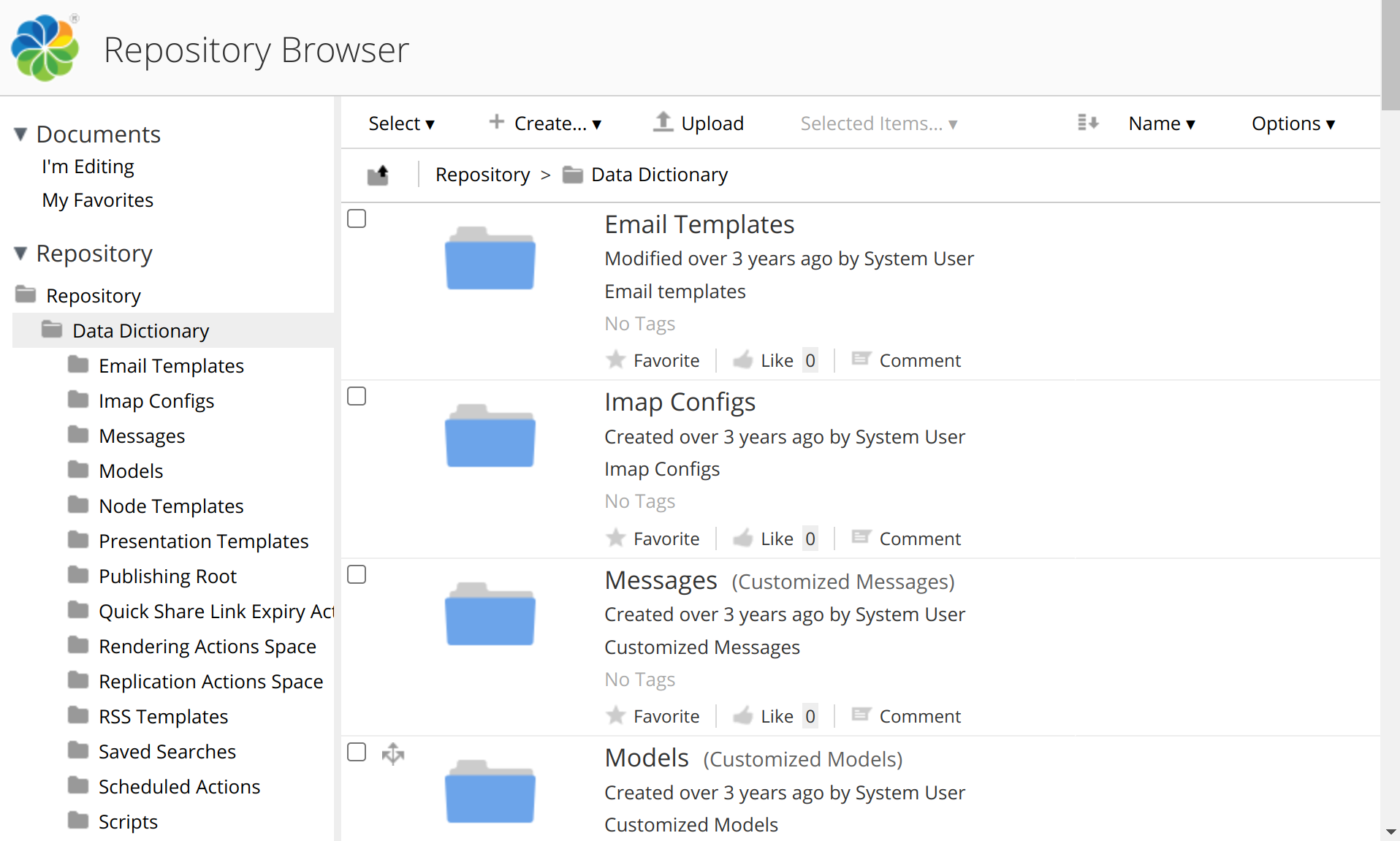
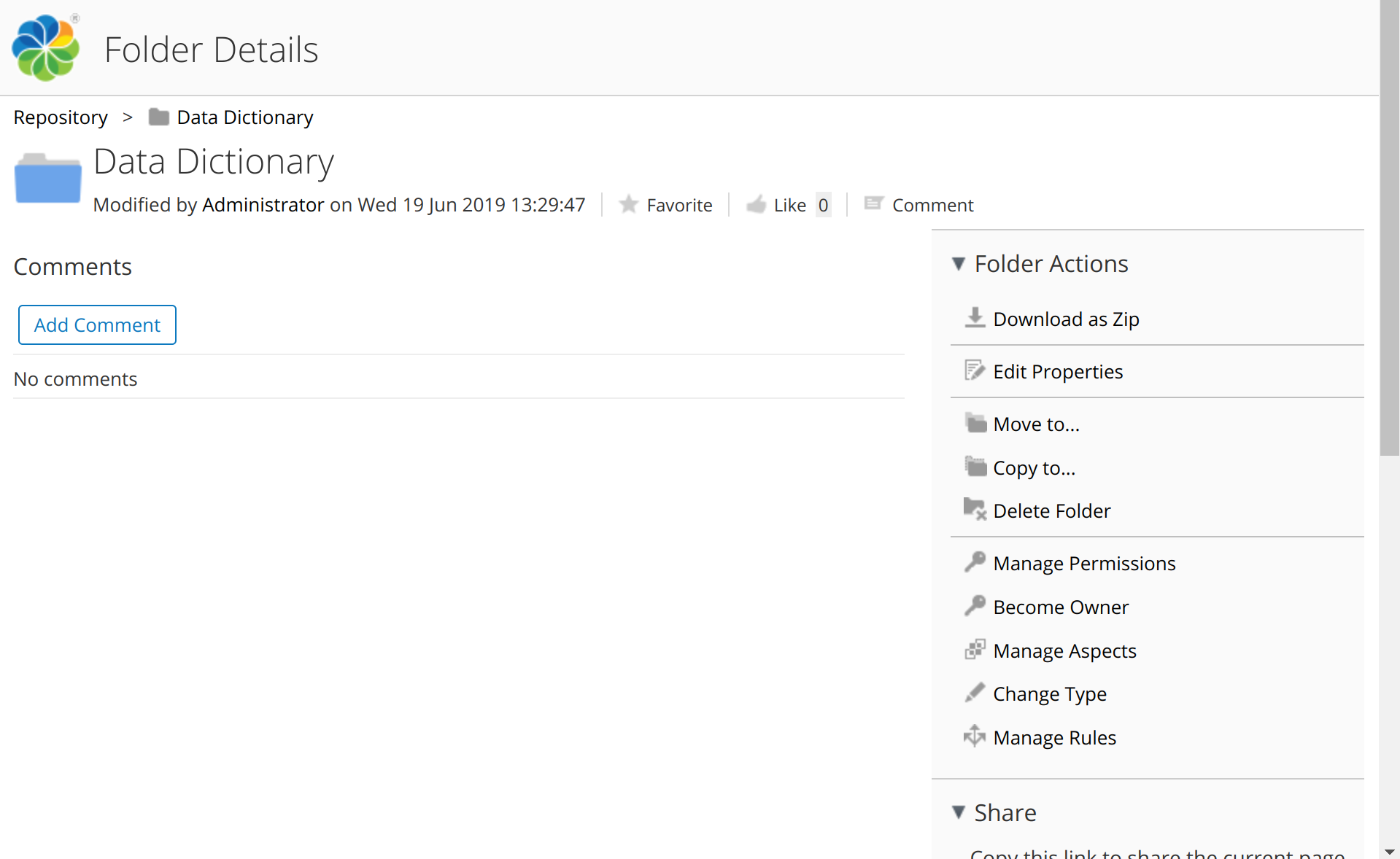
Click URL for folder content |
|
If checked, the click URL for folders will point to the folder content view (See Folder content view for an example). If unchecked the click URL for folders will point to the folder details view (See Folder details view for an example). This option is checked by default. |
Email as principal id |
|
If unchecked, users will be identified by their Alfresco username. If checked, users will be identified by the email from their Alfresco profile. Users without an email will not be able to search. This is an advanced configuration and the value depends on the concrete integration scenario. |
Examples for folder link target views:
HTTP client configuration
Configuration options regarding the HTTP communication with the Alfresco instance. It is part of the ADVANCED configuration tab.
| Name | Property Key | Description |
|---|---|---|
Maximum number of retries |
|
Maximum number of requests for any failed HTTP request. A failed request will lead to a partial synchronization and will be automatically fixed as part of the next synchronization. |
Retry interval |
|
Interval before a failed request is retried. Increasing the amount might improve the chance that the Alfresco instance recovers but will reduce throughput. |
Rebase URI |
|
If unchecked, the connector will assume that all URLs that are returned from Alfresco are directly usable. If checked, the connector will replace host, port and scheme of URLs returned from Alfresco with the values from the 'Click URL base' configuration. This might be necessary, if the Alfresco instance is configured to use a different FQDN than the one which users and the connector must use. This configuration is by default unchecked. |
Content Page Size |
|
The number of items which is returned to list folder items. The default page size is 100. |
Principal Page Size |
|
The number of principals (users or groups for a user) that are returned per query. The default page size is 100. |
Change Processing Page Size |
|
The number of changes which are returned per query. The default page size is 100. |
Cache Size |
|
The maximum number of items which are cached for reuse in e.g. breadcrumbs or property lookups. The default cache size is 10000. |
Cache TTL |
|
The maximum age of an item in the cache, before its information is refreshed. The default time-to-live is 1h. |
CMIS request timeout |
|
The timeout for CMIS content requests. The default timeout is 60s. |
Content filter
Configuration Options related to content selection. Content can be selected based on 4 criteria:
-
Path
-
Properties
-
File Extension (Only documents)
-
Content Size (Only documents)
All criteria contain an exclude and an include list following these rules:
-
If an item matches an exclude entry, it will be excluded.
-
If the include list is empty, all items will pass.
-
If the include list is not empty but the item matches any include list entry, it will be included.
-
Otherwise the item will be excluded.
If multiple criteria are used, an item will have to match all of them to be included. This configuration is part of the ADVANCED tab.
Path filter
An Alfresco path is a sequence of folder names that are separated by a slash, e.g. /my/folder, and always starts with a slash.
| Name | Property Key | Description |
|---|---|---|
Include |
|
Path to a folder or document which should be included (including all children). |
Exclude |
|
Path to a folder or document which should be excluded (including all children). |
| Documents can have multiple paths. In that case, at least one path has to be permitted. If a document is included via multiple paths, it’s breadcrumb will be randomly selected. |
Properties filter
Any property is selectable, and the name of the property depends on the configuration 'User-friendly metadata names' (CMIS identifier or display name). If an item does not have the property, the filter will not be applied. If the property is multi-valued, the filter will only be applied on the first value. The applied filter is case-insensitive equality on the textual CMIS representation of the value. (For boolean properties: true, false; for date properties: milliseconds since epoch)
| Name | Property Key | Description |
|---|---|---|
(Include) Name |
|
Name of a property of documents which should be included. |
(Include) Value |
|
Case-insentive value of that property of documents which should be included. |
(Exclude) Name |
|
Name of a property of documents which should be excluded. |
(Exclude) Value |
|
Case-insentive value of that property of documents which should be excluded. |
File extension filter
This filter is applied on the name of the document: The file extension is defined as the remainder of the name after the last dot. The filter is only applied to documents with a file extension; all folders and documents without any dots in the name automatically pass.
| Documents without a proper file extension but containing dots due to some other reason, e.g. because they contains a date format with dots, will not behave as intended. |
| Filtering on the property cmis:contentStreamMimeType is a more generic and robust solution. |
| Name | Property Key | Description |
|---|---|---|
Include |
|
Extension of a document which should be included. |
Exclude |
|
Extension of a document which should be excluded. |
File size filter
This filter is applied on the file size of the original document (not it’s renditions). In contrast to the setting 'Maximum content size', documents which are excluded by this setting are not indexed at all. The range boundaries are included in the range. Folders will not be filtered.
| Name | Property Key | Description |
|---|---|---|
(Include) Lower boundary |
|
Minimum size of a document which should be included. |
(Include) Upper boundary |
|
Maximum size of a document which should be included. |
(Exclude) Lower boundary |
|
Minimum size of a document which should be excluded. |
(Exclude) Upper boundary |
|
Maximum size of a document which should be excluded. |
| The used units are JEDEC-units, i.e. 1KB = 1024 bytes. |
Lucidworks Fusion 5 Configuration
Instance Configuration
Configuration options for the setup of the connection to the target Fusion instance including authentication/authorization settings.
| Setting | Description |
|---|---|
Technical User |
Username for the technical account with at least the permissions: |
Password |
Password for the specified technical account. The connector will store the value encrypted. |
URL |
URL to the target Fusion instance. |
Use Proxy |
If enabled, the target Fusion instance will be connected through a proxy. |
Proxy URL |
URL of the proxy server including protocol, host and port. |
Proxy Authentication |
If enabled, the connector uses the specified credentials to authenticate towards the proxy. |
Proxy Username |
Proxy authentication username. |
Proxy Password |
Proxy authentication password. The connector will store the value encrypted. |
Indexing Configuration
Configuration options specifying the target indexing pipeline and Solr index for content ingestion.
| Setting | Description |
|---|---|
Indexing Pipeline |
Name of the indexing pipeline. |
Collection Name |
Name of the target Solr index for content ingestion. |
Data Source Configuration
Configuration options specifying the target data source.
| Setting | Description |
|---|---|
Data Source ID |
ID of the Data Source ID. The Connector assigns for the processed documents and principals an ID for the Data Source in the field _lw_data_source_s. |
Principal Indexing Configuration
Configuration options specifying the target indexing pipeline and Solr index for principal ingestion.
| Setting | Description |
|---|---|
Indexing Pipeline |
Name of the indexing pipeline. |
Collection Name |
Name of the target Solr index for principal ingestion. |
HTTP Connection Configuration
Configuration options for fine-tuning the Http connection parameters.
| Setting | Description |
|---|---|
Session Timeout |
The connector uses session-based authentication via cookie. This option specifies the session timeout for preemptively re-creating the session. The default value is set to 1 hour which is also the default defined in Fusion. |
Max. Requests per Seconds |
Max. number of requests per seconds. |
Connection Timeout |
Timeout value after the connection should be closed regardless of its current state. |
Socket Timeout |
Timeout value waiting for data after establishing the connection. |
Max. Number of Retries |
Max. number of retries for failed requests. |
General Configuration
Database Configuration
| Name | Property Key | Description |
|---|---|---|
URL |
|
JDBC URL for the target database. Out of the box, the connector will use H2 file database. For productive usage, use PostgreSQL specifying the URL in format: |
Username |
|
Database Username to read and write to database. |
Password |
|
Database Password for the specified user |
Traversal Configuration
| Name | Property Key | Description |
|---|---|---|
Traversal History Length |
|
Max. number of traversals to store in the history. Once the limit is exceeded, the connector will automatically remove oldest entries in the history. (default: 100) |
Number of Traversal Workers |
|
Number of workers to execute the traversal in parallel. Increasing this value might improve the performance, but will footprint higher memory consumption. It is recommended to keep the default value. (default: 10) |
Traversal Job Poll Interval |
|
Interval between the workers to be triggered to fetch and process the next tasks. (default: 10ms) |
Completion Timeout |
|
If the search engine indexes the items asynchronously, there might be some processing still in-flight during the completion process of a traversal. This value specifies the timeout value until all asynchronous callbacks are expected to return before completing the traversal. (default: 10m) |
Principal Aliaser Configuration
Principal Aliasing is applied on user information as part of Content ACL processing during Content Synchronization and Principal processing during Principal Synchronization. It’s purpose is to map external source system user to the corresponding user in search engines domain. You can configure a list of aliasers in the connector which will be applied in sequence and in order on user ACEs and user principals. The Connector supports following custom aliasing mechanism.
Custom Aliaser Disabled
If the Custom Aliaser checkbox is not selected, the connector will process user information on ACE and user principals unchanged to Search Engine. If all relevant users in the source system can be found with the same identifier in the search engine, this setup is sufficient to reflect the same secure search experience in the search engine as defined by the policy in the source system. The connector uses this option as default to process user information.
Custom Aliaser Enabled
If custom aliasing is enable then there are four types of aliaser avaialble:
Simple XML Table Aliaser
Static mapping table which can be uploaded as XML file. The connector uses the uploaded file as lookup table to map a user in the source system to a user in the search engine. Users missing a record in the file will be dropped from the ACE and during Principal Synchronization. This option is only recommended for environment with a manageable amount of users as for each user the corresponding mapping entry needs to be specified in the file.
| Name | Description |
|---|---|
XML Mapping File |
Browse and upload or drag and drop. |
Sample XML mapping file:
<?xml version="1.0" encoding="UTF-8"?>
<storeddata>
    <entry keyValue="user1">user1@raytion.com</entry>
    <entry keyValue="user2">user2@raytion.com</entry>
    <entry keyValue="user3">user3@raytion.com</entry>
</storeddata>
Regex Replacer Aliaser
Regex Replacer Aliaser computes aliases based on a regular expression. Principals that match the regular expression are replaced by the Substitution String.
| Name | Property Key | Description |
|---|---|---|
Pattern |
|
The regular expression to match, this is the part that will be replaced. If braces (…) are used in the pattern then the matched value can be retrieved using $1 |
Substitute String |
|
String to replace the matching part of the find string. Matched value is accessed by employing $1 |
Regex Extractor Aliaser
Regex Extractor Aliaser computes aliases based on a regular expression. Principals that match the regular expression are inserted into the Insert-Into String.
| Name | PropertyKey | Description |
|---|---|---|
Pattern |
|
The regular expression to match, this is the part that will be inserted into the new value. If braces (…) are used in the pattern then the matched value can be retrieved using $$ |
Insert-Into String |
|
String to replace the matching part of the pattern. Matched value is accessed by employing $$ |
LDAP Aliaser
Ldap Aliaser searches for an LDAP entry with the requested name in the input value and returns the specified output attribute.
| Name | Property Key | Description |
|---|---|---|
Host |
|
Fully Qualified Domain Name of an LDAP server |
Port |
|
Port to use for LDAP connection, defaults are 389/636 or (recommended) 3268/3269 for simple/SSL |
AccountDN |
|
AccountDN for bind to LDAP |
Password |
|
Password part of credentials |
Input Field |
|
The Active Directory attribute name for this equality filter |
Search Root DN |
|
Distinguished Name of the subtree which is searched. The smaller the subtree the better the performance but the higher the chance of encountering principals which are not part of this subtree |
Output Field |
|
Attribute that should be returned in result entries |